SIEMENS logoSiemens Home Appliances

How to Register Your Appliance

Please enter the model number (E-Nr.) to get started.

Then add the purchase date of your appliance in the next field.

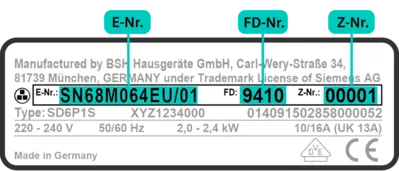
You can find your appliance details (E-Nr., FD, and Z-Nr.) on the appliance type plate. Below, you can see an example of a type plate and where it is usually located on your appliance.

Example of an Appliance Typeplate:

Label displaying model information with serial numbers for a Siemens appliance, including E.Nr, FD and Z.Nr specifications.

If you need help finding your appliance data click the link below:

Appliance Information

Scan/upload your appliance typeplate or enter the data manually below.

Up to 1 image • JPG, JPEG or PNG • Up to 5MB

or

MySiemens
Register for free and enjoy many benefits.
Register now
Find a dealer
Find dealers or service shops near you.
Get in touch
Experience Siemens
Discover quality, perfection, and reliability.
Discover more
Our service
Outstanding service – before and after the purchase.
Find out more