Get to know your Siemens oven symbols
Discover every setting and intelligent function.
Oven Symbols Guide
Do you wonder what the symbols on your oven mean? Or what is the best oven setting for baking or grilling? Let’s take a closer look at all the heating modes and intelligent functions that you can use. Please note the naming might vary depending on different model.
Oven symbols for heating modes



4D hotAir
3D hotAir
Hot air gentle
Ideal for all types of food, 4D hotAir allows you to cook sweet and savoury simultaneously on up to 4 shelves, without flavours and smells intermingling.
Ideal for all types of food, 3D hotAir allows you to cook sweet and savoury simultaneously on up to 3 shelves, without flavours and smells intermingling.
hotAir Gentle is designed for the gentle, slow cooking of poultry and smaller cuts of meat, delivering even cooking results without the need for preheating.

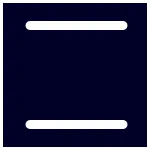

Intensive heat
Top/bottom heating
Bottom heating
For dishes with a crispy base. The heat is emitted from above and more intensively from below.
For traditional baking and roasting on one level. Especially suitable for rich fruit cakes.
Heating the oven from the base, the bottom heat setting is ideal for casseroles, curries, slow cooking and even bain marie’s.
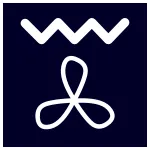

Hot air grilling
Grill, large area
Grill, small area
For roasting larger pieces of meat, poultry and whole fish. The grill element and the fan switch on and off alternately, causing hot air to circulate around the food.
For grilling flat items such as steaks, sausages or bread, and for browning food. The whole area of the grill heating element becomes hot.
For grilling small quantities of food such as steaks, sausages or bread, and for browning food. The centre part under the grill heating element becomes hot.



coolStart
Pizza setting
Microwave
No more preheating when cooking chilled and frozen convenience food. Using an intelligent heating phase, it is now possible to cook frozen and chilled food without waiting for the oven to preheat.
Using top and bottom elements with the bottom emitting more powerful heat. Perfect for crisping pizza bases or tarts.
The microwave can be used on its own or in combination with a type of heating (varioSpeed). Cook, heat up or defrost food quickly. You can find the suitable types of heating modes in the user manual.

Slow cooking
Drying
Keeping warm
For gentle and slow cooking of seared, tender pieces of meat in ovenware without a lid. The heat is emitted evenly from the top and bottom at low temperatures.
For drying herbs, fruits and vegetables.
For keeping your cooked food warm.

Preheating ovenware
Defrosting
For preheating your ovenware.
For defrosting, e.g. meat, poultry, bread and cakes. The fan causes the warm air to circulate around the dish.
Oven symbols for steaming


Sous vide
fullSteam
fullSteam Plus
Cook meat, fish, vegetables and desserts under a vacuum, at low temperatures and with 100% steam.
Cook your dishes gently and naturally with steam. Food retains aromas, vitamins, minerals, and its natural look.
Gently steam vegetables, meat, fish and cereal. Juice fruit. Blanch food. In order to reduce the cooking time, more robust food can be steamed at above 100 °C.



addedSteam
Reheating
Dough proving
Suitable for certain types of heating, the combination of steam and hot air turns food crispy on the outside and juicy inside.
For gently heating up food and for crisping up pastries. The steam ensures that the food does not dry out.
For leaving yeast dough and sourdough to prove and for culturing yogurt. Dough will prove more quickly than at room temperature without becoming dry on the surface.
Oven symbols for functions



Fast preheat
Auto programmes
activeClean®
By activating all heating elements simultaneously, Siemens ovens with fast preheating get to the desired temperature very quickly.
Preinstalled settings for a range of dishes ensure the appropriate heating mode, temperature and cooking duration for optimum results.
Heating the cavity up to 480°C, activeClean® burns away all dirt and grime. The remaining ashes can then be easily wiped away making cleaning your oven effortless.



Coated walls
Coated backwall
Oven light
A special coating is applied to the back, roof and side of the oven which is designed to help reduce the need for manual oven cleaning. It continuously breaks down dirt from oil and grease during oven operation and regenerates when heated as part of normal appliance use or when using the special cleaning cycle.
A special coating is applied to the back wall of the oven which is designed to help reduce the need for manual oven cleaning. It continuously breaks down dirt from oil and grease during oven operation and regenerates when heated as part of normal appliance use.
Switch the interior lighting on or off.



Open cover for steam ovens
Start / Stop
Childproof lock
This function is available on steam ovens. Lift up the control panel of the oven to empty the water tank or to refill it.
Starts, pauses or cancels operation.
Siemens oven has a childproof lock to prevent children from accidentally switching it on or changing any running program.
Oven symbols for time-setting



Time-setting operations
Cooking time
End time
Opens up the menu within its options for time-setting.
A signal makes a sound once a set cooking time has elapsed. The appliance switches off automatically.
Set cooking and end time. The appliance switches off automatically ensuring to end cooking at the desired time.